tp
Developer Guide
Acknowledgements
This project was built from scratch by the UniTasker team. The following third-party libraries and references were consulted during development:
- Java SE 17 Standard Library
- JUnit 5
- PlantUML
- SE-EDU AddressBook-Level3
Design
This section describes the design and implementation of the key components of UniTasker. UML diagrams are provided for highlighted classes and interaction flows
Architecture
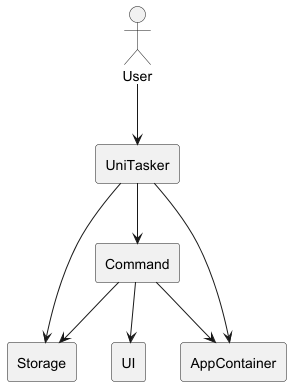
The Architecture Diagram given above explains the high-level design of the App
Main components of the architecture
UniTasker is in charge of the app launch and shut down
- At app launch, it initializes the other components and repeatedly waits for user inputs.
- At shut down, it shuts down the other components.
The bulk of the app’s work is done by the following components:
- Command: Responsible for executing user instructions correctly
- UI: Responsible for displaying messages to the user.
- AppContainer: Acts as a central container for sharing application data.
- Storage: Responsible for saving and loading data from local files.
How the architecture components interact with each other:
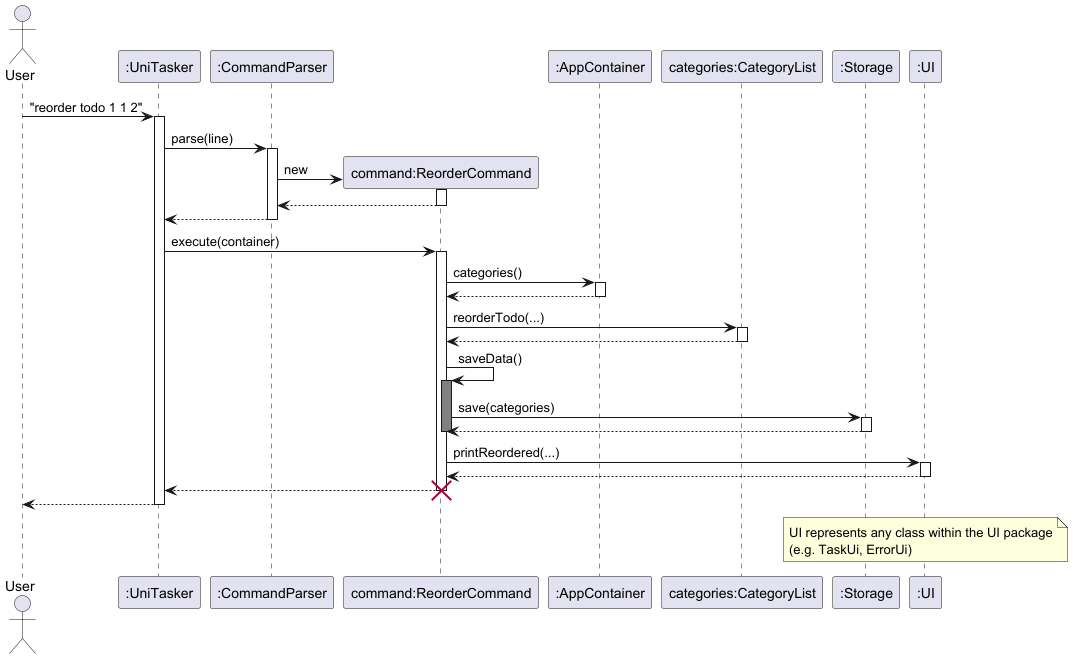
- User enters command in terminal
- UniTasker reads the input and passes it to CommandParser
- CommandParser identifies the command type and creates a corresponding Command object
- The Command object calls its execute() method with the AppContainer instance
- The Command modifies the appropriate data structures within AppContainer (categories, tasks, calendar)
- The Command calls Storage to persist changes to disk
- UI components display the result of the operation to the user
AppContainer component
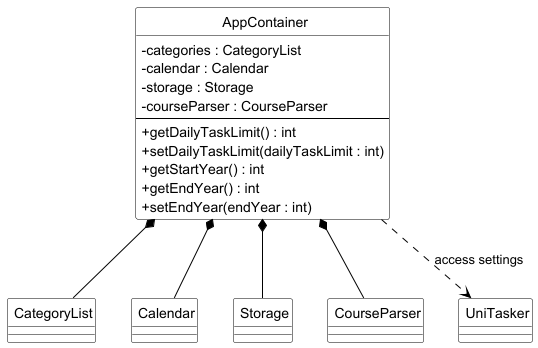
The AppContainer consists of the following:
CategoryList categories– stores all categories and their associated tasks (todos, deadlines, events)Calendar calendar– Manages the mapping of dates to tasks with date information (deadlines and events)Storage storage– handles saving and loading of data from local filesCourseParser courseParser– processes and handles course-related commands
The AppContainer component,
- Stores all the information required for the application in a single object
- Is passed as an object reference to commands during execution, enabling access to shared application data and services without relying on global variables
Storage component
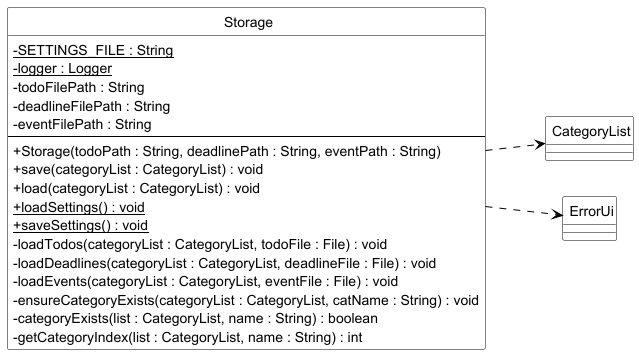
The Storage component consists of the following:
String todoFilePath- path to the local file storing todo tasksString deadlineFilePath- path to the local file storing deadline tasksString eventFilePath- path to the local file storing event tasksString SETTINGS_FILE- path to the file storing application settings (daily task limit, end year)
The Storage component,
- Serializes and persists the current state of CategoryList to disk across three separate files (todos, deadlines, events)
- Deserializes and reconstructs the CategoryList on startup by reading from those files, skipping malformed lines gracefully
- Loads and saves application-level settings (e.g. daily task limit, calendar end year) independently of task data
UI component
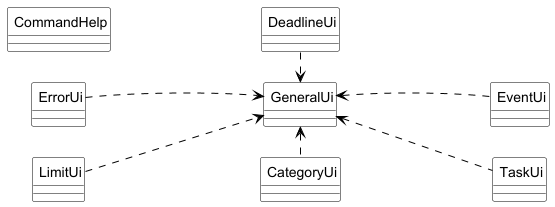
The UI package consists of the following classes:
GeneralUi– central utility class providing shared print helpers (bordered output, welcome screen, reminders) used by all other UI classesErrorUi– handles all error and warning messages shown to the userCategoryUi– handles output for category-related actions (add, delete, list)DeadlineUi– handles output for deadline-related actions (add, delete)EventUi– handles output for event-related actions (add, delete, recurring events)TaskUi– handles output for todo-related actions (mark, priority, sort, reorder, find)LimitUi– handles output for limit and course result messagesCommandHelp– provides formatted help text for all command modes and topics
The UI package,
- Decouples all display logic from business logic by centralizing output into dedicated classes per task type
- Routes all formatted output through GeneralUi as a single shared rendering layer, ensuring consistent visual formatting across the application
Command component
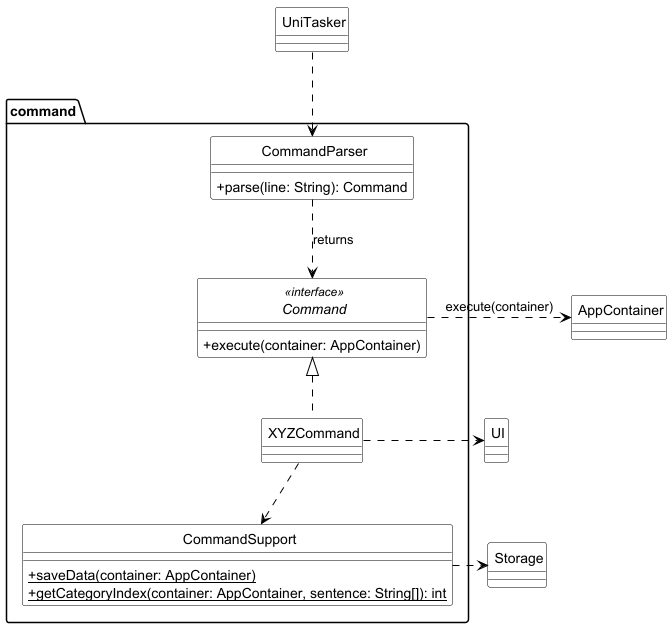
The Command component handles the execution of user commands. Each supported command is represented by a separate command class implementing the common Command interface.
The component consists of:
CommandParser, which maps raw user input to a concrete command objectCommand, which defines the commonexecute(AppContainer container)method- Concrete command classes such as
AddCommand,DeleteCommand, and so on. CommandSupport, which provides shared helper methods such as data saving and category index retrieval
Note: For most commands, the category index is expected to be at a fixed position (third element)
in the input array. This design allows the use of a shared helper method in CommandSupport to
consistently extract the category index.
How the Command component works:
- User input is received by
UniTasker - Input is passed to
CommandParser CommandParserreturns the appropriateCommandobjectexecute(container)is called- Command updates the model via
AppContainer - Changes are saved via
Storage - Output messages are displayed via
UI
Implementation
CategoryList Class Diagram
The figure below illustrates the high-level structure of CategoryList within the AppContainer.
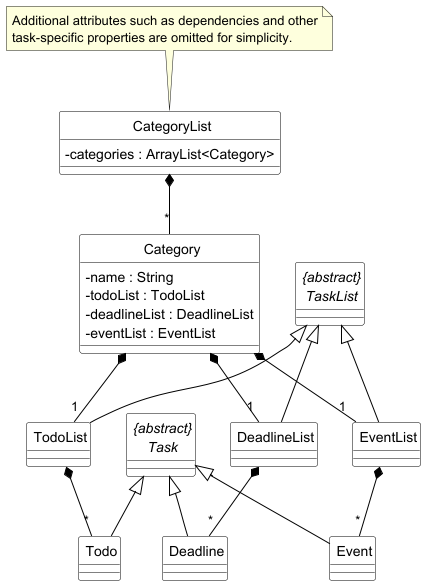
CategoryList consists of a collection of Category objects. Each Category contains three task lists:
TodoListDeadlineListEventList
These task lists store their corresponding task types:
TodoListstoresTodoobjectsDeadlineListstoresDeadlineobjectsEventListstoresEventobjects
All task types inherit from the abstract Task class, while the three task list types inherit from the abstract TaskList class.
The CategoryList class:
- acts as the central data structure for storing and accessing all categories
- allows unified control over todos, deadlines, and events through their parent categories
- provides methods for category-level operations such as adding, deleting, and reordering categories
- provides methods for task-level operations such as adding, deleting, marking, unmarking, reordering, and setting priorities
- can be accessed via
AppContainer
This design allows related tasks to be grouped under a category, making it easier for users
to organize work by module or context. It also improves maintainability by centralizing
task management logic within CategoryList and Category.
Delete Marked Command
The delete marked command allows users to remove all completed tasks in a single command.
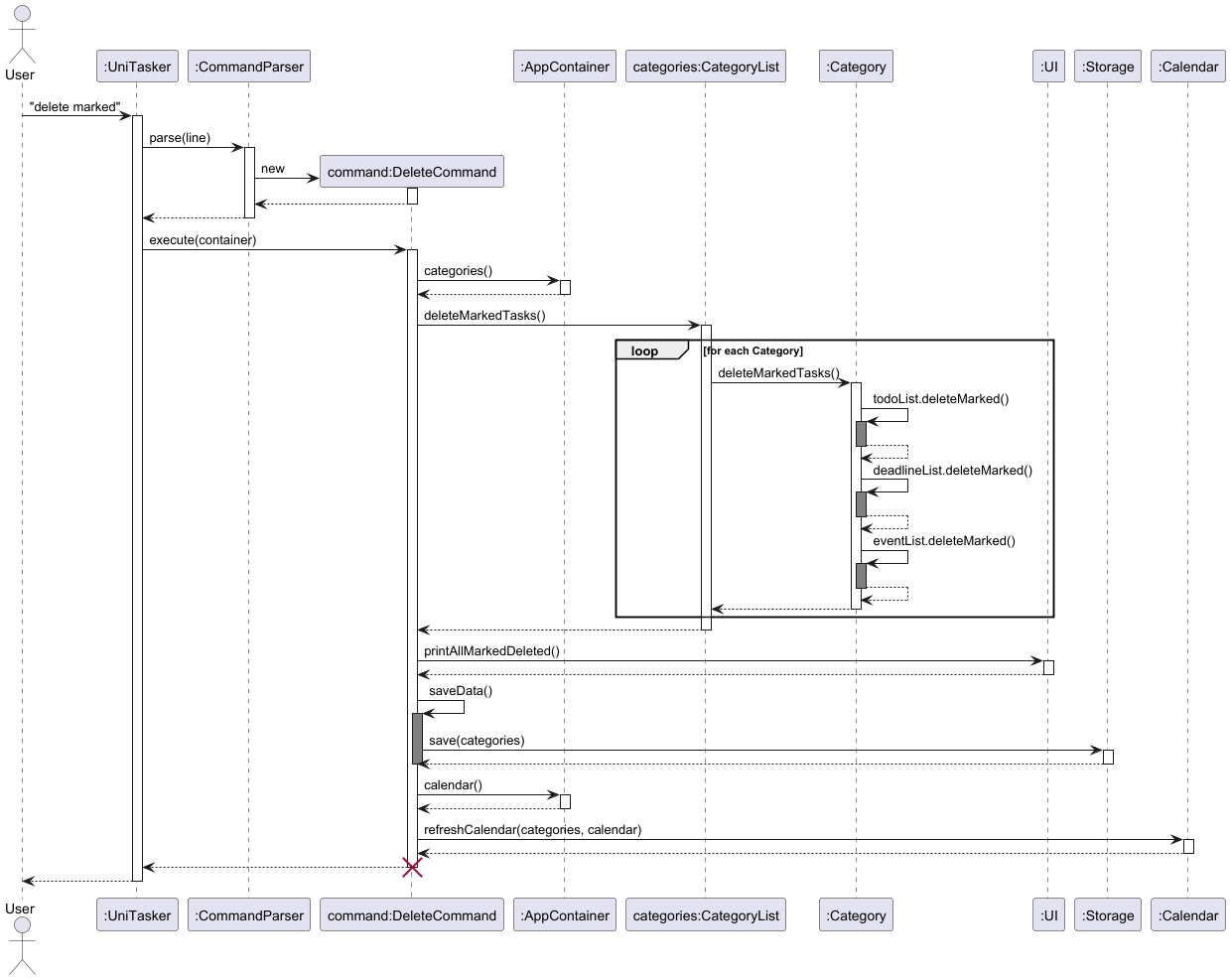
The sequence diagram above shows how the delete marked command is handled by DeleteCommand.
How it works
- The user enters the
delete markedcommand. DeleteCommandretrieves theCategoryListfrom theAppContainer.DeleteCommandcallsdeleteMarkedTasks()onCategoryList.CategoryListiterates through allCategoryobjects it stores.- For each
Category,deleteMarkedTasks()is called. - Each
Categorythen removes marked tasks from all three task lists:TodoListDeadlineListEventList
- After deletion is complete, a confirmation message is printed through the
UI. - The updated data is saved through
Storage. - The calendar is refreshed to keep it consistent with the updated task data.
Design Rationale
This feature demonstrates that CategoryList acts as the central access point for all categories and their associated task lists.
By delegating the deletion process through CategoryList and Category:
- the command layer does not need to access
TodoList,DeadlineList, andEventListdirectly - task management logic remains encapsulated within the model
- bulk operations can be applied consistently across all task types
This design improves modularity and keeps command logic simple, while allowing CategoryList to coordinate operations affecting all three task lists.
Deadline Class Diagram
The figure below illustrates the relationship between Deadline class and the following classes: Task, Timed, Calendar, DateUtils, DeadlineList, TaskList.
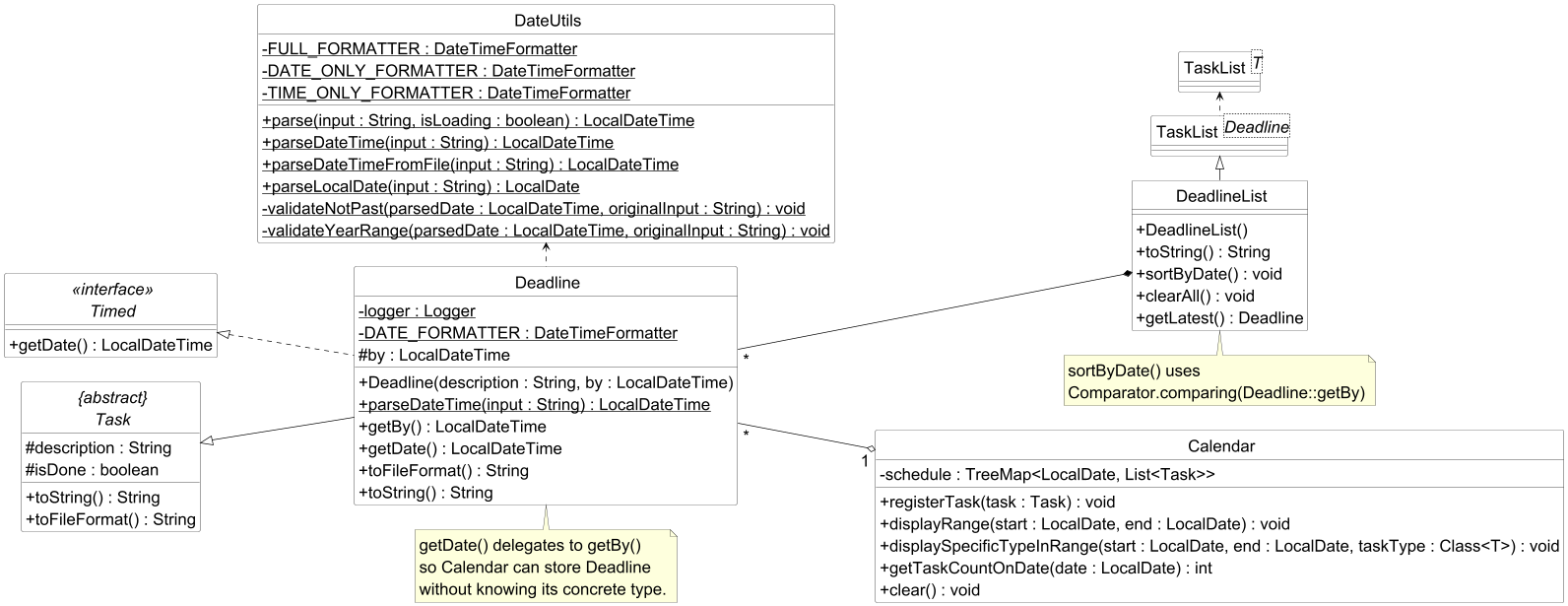
The Deadline class consists of the following members:
logger- private logger instance used for fin-grained diagnostic logging on object creationbystores the due date and time (LocalDateTime) by which the task must be completedDeadline (description, by)- constructor that initializes the task with a description and deadline, delegating to the parentTaskparseDateTime(input)– static helper that delegates to DateUtils to parse a date/time string into a LocalDateTimegetBy()– returns the raw deadline date/timegetDate()– satisfies the Timed interface by delegating to getBy(), enabling calendar and sorting integrationstoFileFormat()– serialises the task into pipe-delimited storage format (D, done, description, datetime)toString()– produces a human-readable representation prefixed with [D]
The Deadline class,
- Extends
Taskto inherit description and completion state, adding only thebyfield to keep deadline-specific logic self-contained - Implements the
Timedinterface so thatCalendarcan register and sortDeadlineobjects polymorphically without depending on the concrete type - Delegates all date parsing to
DateUtils, ensuring consistent validation and formatting rules are applied uniformly across task types
Event management
The event commands manages one-time occurrences and automated recurring schedules, utilising a mapping layer to ensure UI actions correctly modify the underlying data.
Note: The relationship between Event class with EventList, Tasked, Timed, Calendar, DateUtils and TaskList classes is similar to the relationship between Deadline class and the classes mentioned above under the Deadline Class Diagram section.
Add Event Command
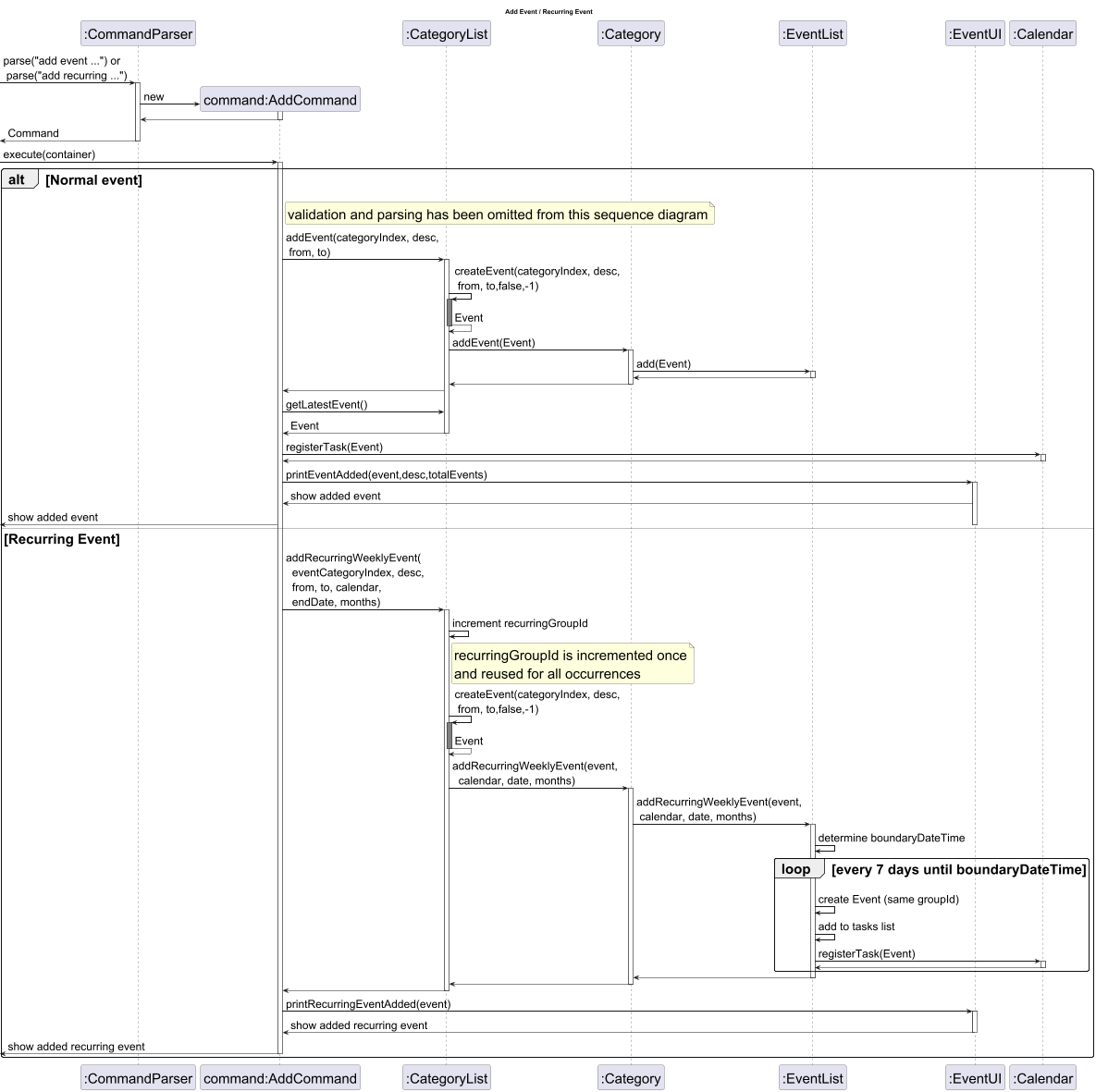
Workflow for Add Event command
- User enters either:
add event <categoryIndex> <description> /from <startDateTime> /to <endDateTime>add recurring <categoryIndex> <description> /from <day> <time> /to <day> <time> /(date or month) <dateOrMonth>
- Input is parsed and
AddCommandis created. AddCommandcallsCategoryListfunctions to add events.- If non-recurring:
EventListadd(Event)is called
- If recurring:
EventListaddRecurringWeeklyEvent(event, calendar, date, months)is called to generate and group weekly events.
- Event(s) are stored in
EventList, persisted byStorage, and reflected in theCalendar
Sequence Diagram for add event command
List Event Command
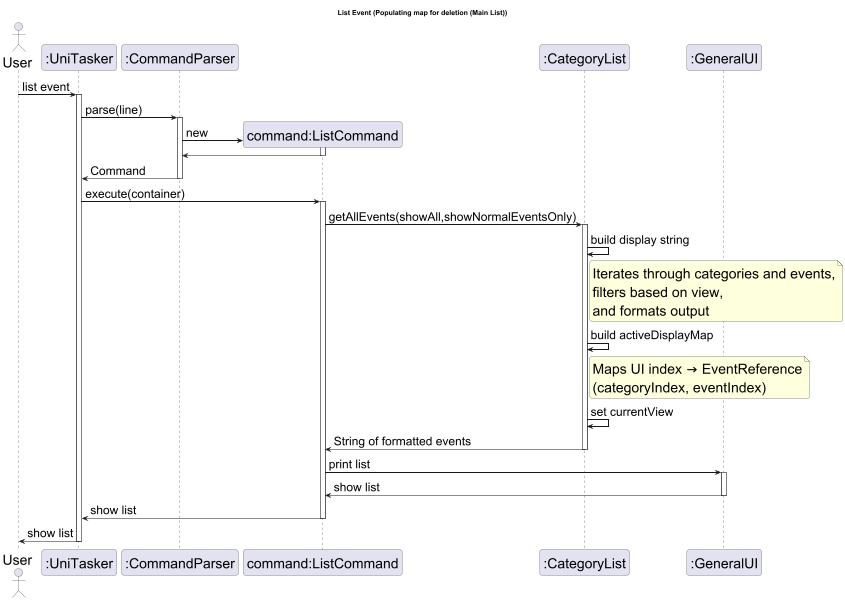
Workflow for List Event command
The list command is a prerequisite for deletion and modification as it synchronises the user’s view with the underlying data coordinates.
-
User enters a command such as
list event,list recurring, orlist event /all. -
Input is parsed by the
CommandParser, which creates aListCommandobject. -
ListCommand calls
CategoryList.getAllEvents(showAll,showNormalEventsOnly)with flags determining the view (e.g., collapsed vs. expanded). -
Mapping Generation: As the
CategoryListiterates through categories and events to build the display string, it simultaneously populates theactiveDisplayMap. -
Each displayed line is assigned a UI Index, which is mapped to an
EventReferencecontaining the (categoryIndex, eventIndex). -
The formatted string is sent to
GeneralUifor display, and thecurrentViewis updated to allow subsequent delete or edit commands to reference the correct map.
Sequence Diagram for list event command
Delete Event Command
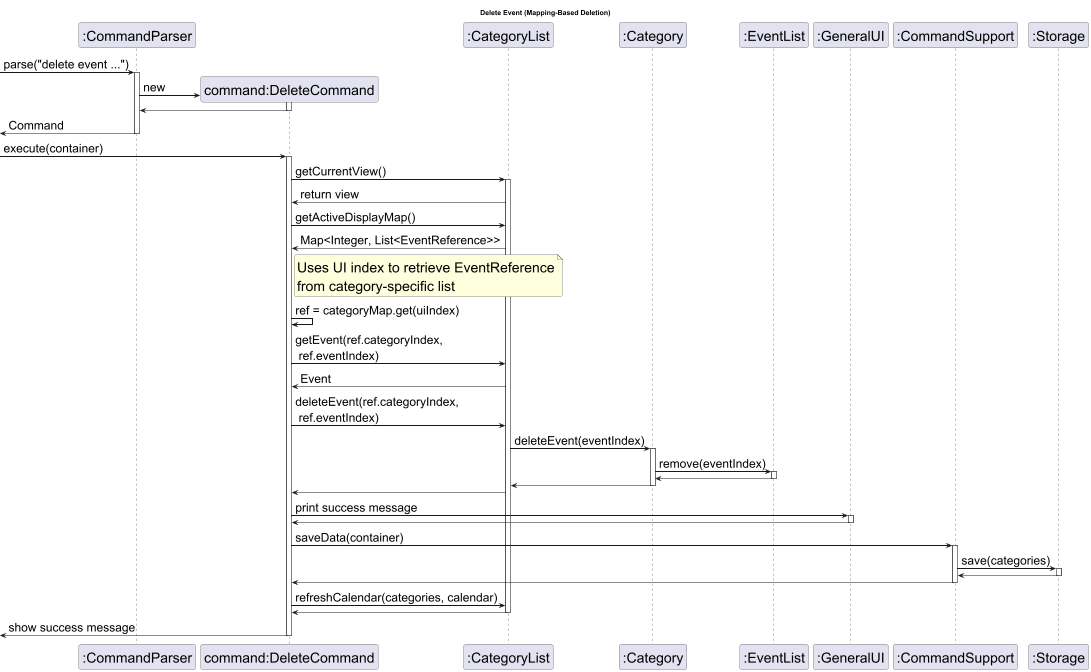
Workflow for Delete Event command
- User types
delete event <categoryIndex> <uiIndex>which is parsed byCommandParserclass to create aDeleteCommandobject - In
DeleteCommandunder ‘event’ uiIndex is parsed and used as an index in the list ofEventReferenceobjects to get the particularEventReferenceobject - Event is then deleted using
EventReference.categoryIndexandEventReference.eventIndex. - Changes are updated in
Storageclass andCalendarobject
Note:
list eventmust be called beforedelete event <categoryIndex> <uiIndex>to populate the map correctlydelete occurrence <categoryIndex> <uiIndex>anddelete recurring <categoryIndex> <uiIndex>works the same except for deleting multiple events at once (all events in recurring group) fordelete recurring <categoryIndex> <uiIndex>
Sequence Diagram for delete event <categoryIndex> <uiIndex> command
Key Design Considerations
The following architectural choices ensure that UniTasker remains efficient, extensible, and user-friendly despite the complexity of time-based data.
1. UI-to-Data Mapping
To maintain a clean user interface, UniTasker utilises a translation layer that bridges the gap between the “collapsed” UI view and the detailed data model:
EventReferenceTracking: Each UI entry is backed by anEventReferencestoring the (categoryIndex, eventIndex). This acts as a direct pointer to the actual data object in theEventListActiveDisplayMap: ThisMap<Integer,List<EventReference>>map (where the key is the category index and the value is a list ofEventReferenceobjects) is populated during list commands. It ensures that when a user inputs a UI index (e.g., delete event 1 5), the command resolves to the exact physical index in the backend.- Data Integrity: This mapping allows the system to support complex views such as grouping weekly lectures while ensuring that deletions and modifications target the correct individual data objects.
Example:
list event /all
| categoryIndex | uiIndex | EventReference (categoryIndex, eventIndex) | Description |
|---|---|---|---|
| 0 | 1 | (0,0) | consultation |
| 0 | 2 | (0,1) | CS2113 tutorial |
| 0 | 3 | (0,2) | meeting |
| 0 | 4 | (0,3) | CS2113 lecture |
| 0 | 5 | (0,4) | CS2113 tutorial |
| 0 | 6 | (0,5) | CS2113 lecture |
| 1 | 1 | (1,0) | yoga lesson |
| 1 | 2 | (1,1) | yoga lesson |
list event
| categoryIndex | uiIndex | EventReference (categoryIndex, eventIndex) | Description |
|---|---|---|---|
| 0 | 1 | (0,0) | consultation |
| 0 | 2 | (0,1) | CS2113 tutorial |
| 0 | 3 | (0,2) | meeting |
| 0 | 4 | (0,3) | CS2113 lecture |
| 1 | 1 | (1,0) | yoga lesson |
list recurring
| categoryIndex | uiIndex | EventReference (categoryIndex, eventIndex) | Description |
|---|---|---|---|
| 0 | 1 | (0,1) | CS2113 tutorial |
| 0 | 2 | (0,3) | CS2113 lecture |
| 1 | 1 | (1,0) | yoga lesson |
2. Polymorphism and Time-Based Tasks
UniTasker treats deadlines and events differently from todos to enable advanced scheduling features:
- Inheritance: A shared interface allows the
Calendarclass to store and query deadlines and events polymorphically. This enables range queries (e.g., “show all tasks this week”) without theCalendarneeding to know the specific task type. - Efficient Lookups: The
Calendaruses aTreeMap<LocalDate, List<Task>>. This structure provides O(log n) lookup times for specific dates and efficient range-based sub-maps, avoiding the need to iterate through the entire global task list. - Formatting Flexibility:
DateUtilsencapsulates threeDateTimeFormatterconstants, to store deadlines and events in different formats.
3. System Integrity and Hierarchy
- Centralised Hub: The
CategoryListacts as a central task management hub, interfacing with multiple specialized task lists (TodoList,DeadlineList,EventList) to maintain separation of concerns - Defensive Programming: Java assertions are used throughout the codebase to validate preconditions and invariants, such as ensuring task descriptions and category names are non-empty
- Inheritance:
DeadlineListandEventListextends the genericTaskList, inheriting add/delete/mark/contains operations.
Helper functions: Task Validation
There are two main types of validations for task.
- Time Validation
- Occurrence Validation
The following figures explains how tasks are validated based on Time and Occurrence.
DateUtils.parse()
DateUtils is used as a Time Validator.
The sequence diagram below illustrates how a date string entered by the user is parsed, validated, and return as a LocalDateTime. This flow is triggered whenever a timed task, a deadline or event, is added. Recurring events will be illustrated in a different diagram as it does not follow numerical convention.
Example: Add deadline 1 Homework /by 31-12-2025 1800 or Add event 1 Homework /from 31-12-2025 1800 /to 01-01-2026
Note: The command in the diagram has been generalized as a date since DateUtils validates dates only
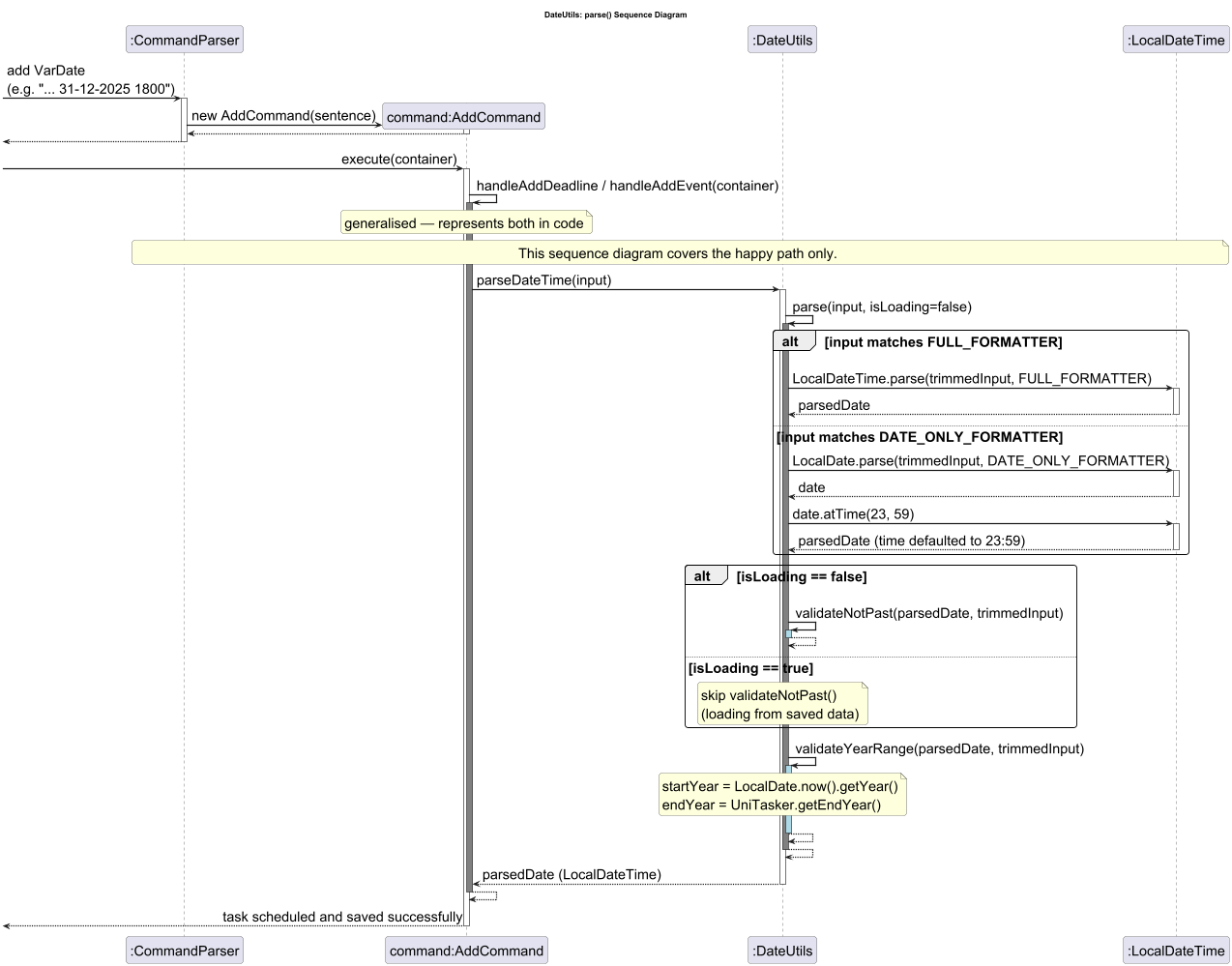
Parsing Flow Summary:
- A task is followed by a date string
- CommandParser parse the line and calls AddCommand
- AddCommand then calls for handleAddEvent/handleAddDeadline, depending on whether an event or a deadline is being added.
- As this is a command given from User, the isLoading flag is set to false.
- DateUtils will then check for the following conditions : is input empty or null, is the date parsed following the FULL_FORMATTER or DATE_ONLY FORMATTER
- If only date is parsed, time is automatically set to 2359
- If all the above checks pass and isLoading == false, check if date is in the past
- If all checks pass, the last check would be if the task exist within the stipulated timeframe that user has set/ default timeframe
- If all checks are parsed, the task will be added to its tasklist (DeadlineList or EventList) and registered in the Calendar
- If any of the checks fail along the way, an error message pertaining to the error will be shown to the user
Implementation Note - isLoading Flag
The isLoading parameter is set to true when DateUtils.parse() is called from the storage layer (file loading), and false during user input. This allows tasks saved in a previous session to be restored if their dates have now passed, while preventing the user form directly scheduling past tasks interactively.
TaskValidator
TaskValidator ensures that there is a unique occurrence of a given task with no overlaps.
Before any task (Todo, Deadline, Event) is added to the system, the AddCommand invokes three sequential validation passes via TaskValidator. These checks ensure that no Task have the same name, workload per day does not exceed set limit and there is no overlap in events. The diagram below shows the full interaction.
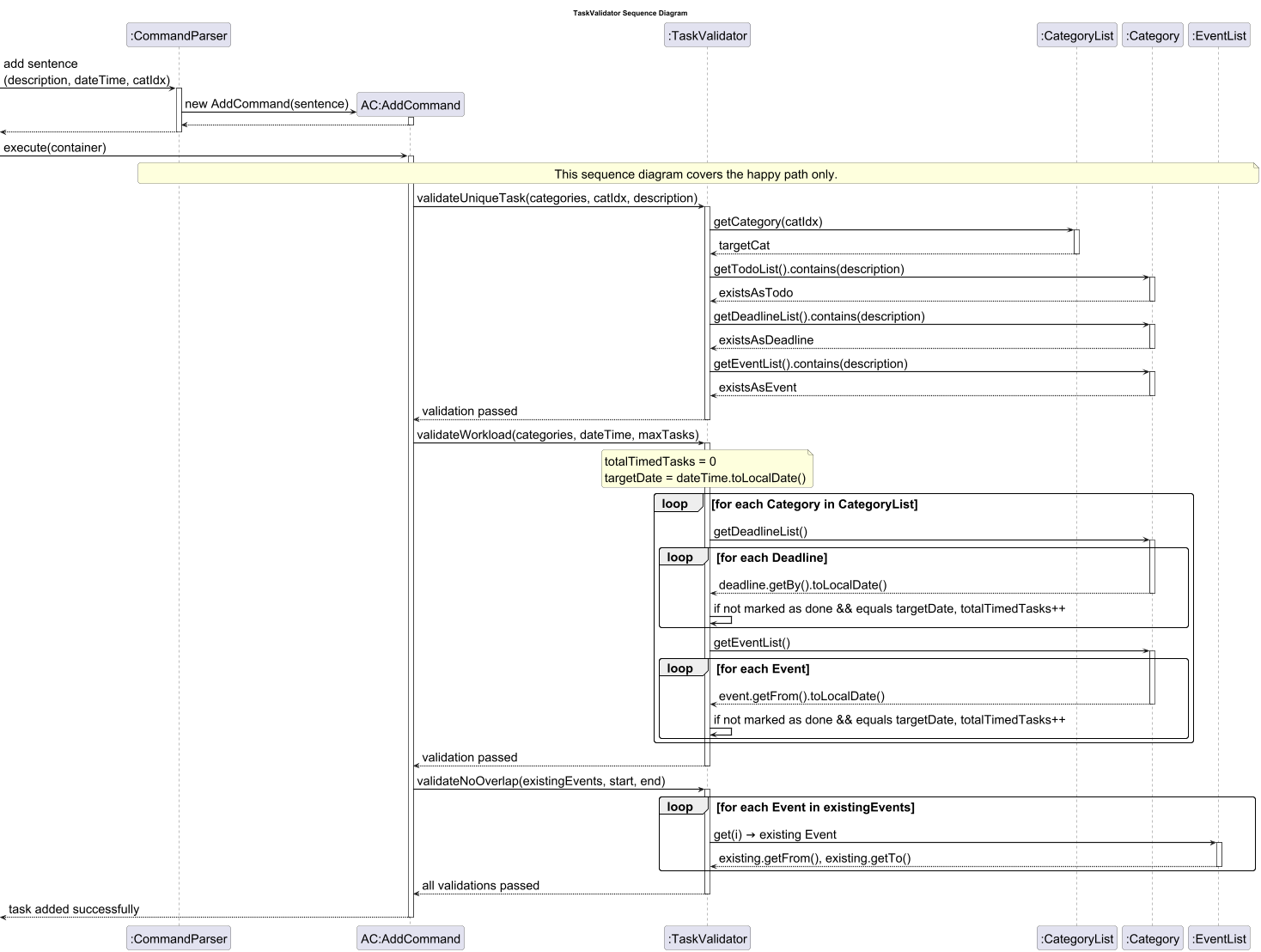
Parsing Flow Summary
- add task with its description, date with or without time and category index
- retrieve all tasks from todoList, deadlineList and eventList
- Check for any duplicate names, if no check the number of workload for each day with registered timed task
- If totalTimedTask is greater than or equal to maxTask, throw a HighWorkloadException error
- Otherwise, check for any overlap in timing with existing events
- If yes throw an OverlapEventException, otherwise all validators have been passed and task is added successfully
Feature: Course Tracker
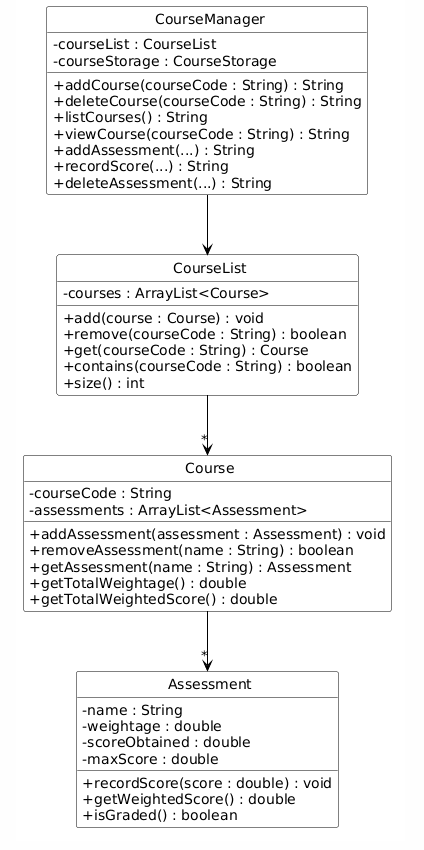
The Course Tracker feature allows students to manage their courses and track their assessment scores and weightages.
Course Class Diagram
The following sequence diagram shows how a course add command is executed:
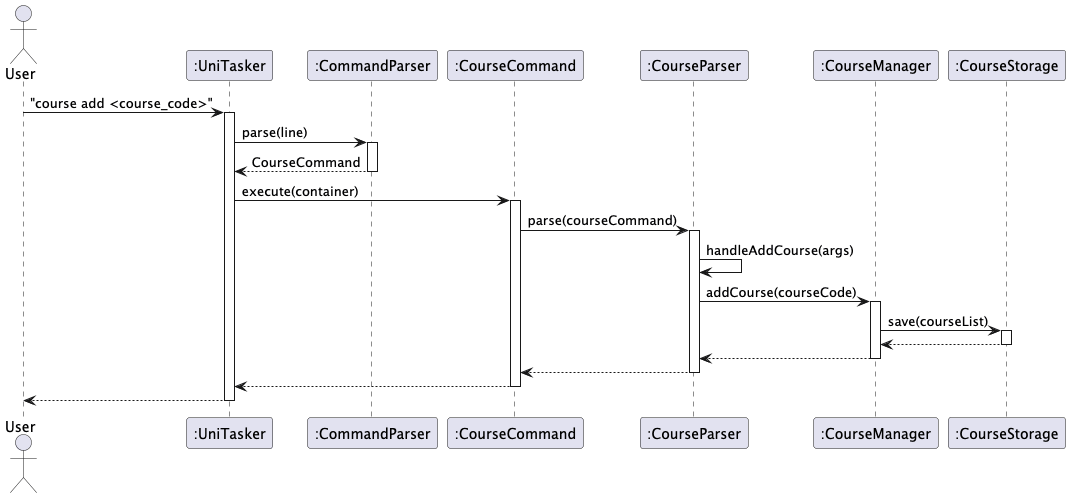
Key Design Considerations
CourseParseris kept separate fromCommandParserto isolate course-specific parsing logicCourseManageracts as the single point of access for all course operationsCourseStorageis a separate class from the mainStorageclass, handling course data persistence in its own file (courses.txt) using a different block-based format- Weighted score is calculated as:
weightedScore = (scoreObtained / maxScore) * weightage
Feature: Undo (Course Commands)
The undo feature allows users to reverse the most recent course command that modified data.
The following sequence diagram shows how an undo command is executed:
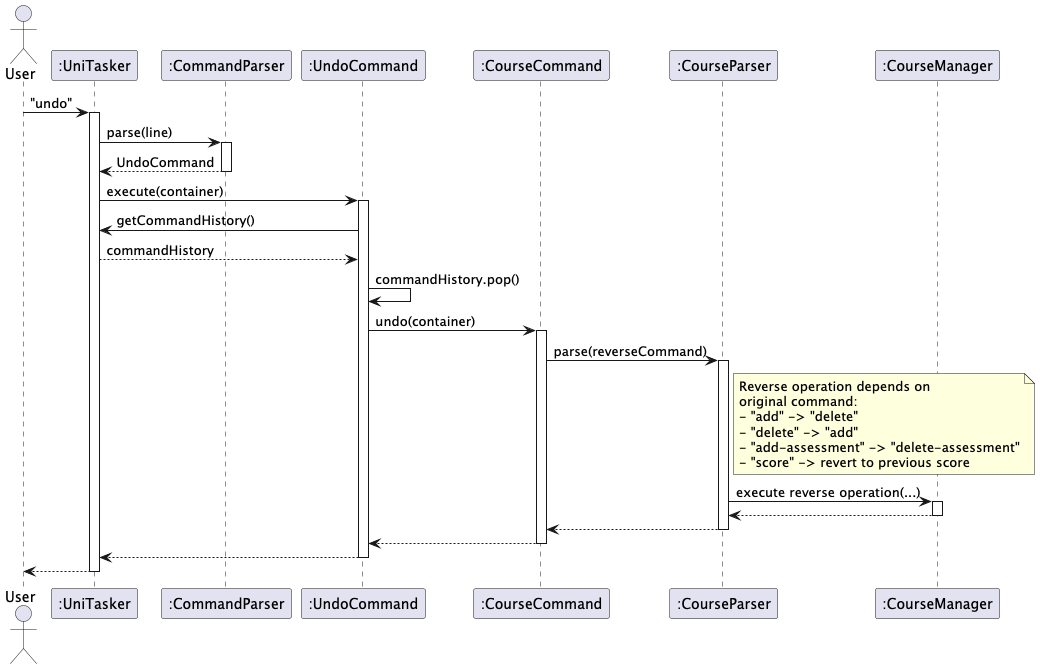
The following class diagram shows the structure of the undo feature:
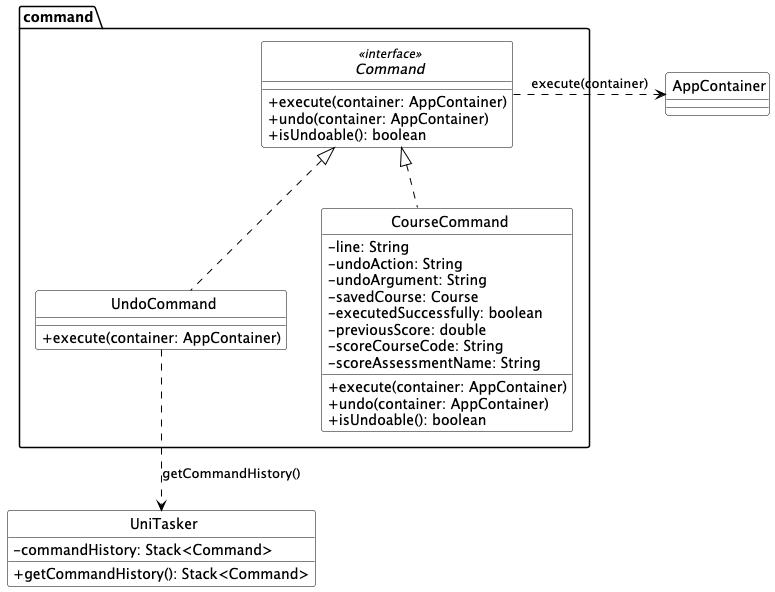
Key Design Considerations
UniTaskermaintains aStack<Command>to track undoable commandsCommandinterface exposes defaultundo()andisUndoable()methods so existing commands are unaffected- Only course commands that modify data are pushed to the stack (
add,delete,add-assessment) - Undo history is cleared on app exit
Current Limitation
Undo is currently supported for course commands only. Other commands such as add todo,
add deadline and add event are not undoable. This is a known limitation planned as a future enhancement.
Product scope
Target user profile
UniTasker is designed for university students who need to manage multiple courses, assignments, deadlines, and personal tasks simultaneously. These users often:
- juggle academic responsibilities across different modules, each with varying deadlines, priorities, and schedules.
- require a simple and efficient system to organize their tasks, keep track of coursework, and stay on top of deadlines.
- prefer a fast, keyboard-driven interface over GUI-heavy applications
Value proposition
University students often struggle to keep track of tasks and course assessments across different platforms such as learning portals, calendars and notes. This fragmented approach leads to missed deadlines, poor prioritization, and unnecessary stress.
UniTasker provides a centralized task management solution that consolidates todos, deadlines, events and course information into a single platform. Through a simple command-line interface, it allows students to efficiently organize, update, and review their tasks and assessments. This helps students to stay on top of their workload and focus on completing their academic responsibilities.
User Stories
| Version | As a … | I want to … | So that I can … |
|---|---|---|---|
| v1.0 | University Student | create categories for each of my courses | organise my tasks by module |
| v1.0 | University Student | view a specific category | focus on tasks related to a single course |
| v1.0 | University Student | assign priority levels to todos in a category | identify important todos easily |
| v1.0 | University Student | sort todos within a category by priority | focus on high-priority todos first |
| v1.0 | University Student | track all tasks with a due date | keep track of all my deadlines |
| v1.0 | University Student | arrange tasks which occur or are due within a certain time period | prioritise tasks that are due earlier |
| v1.0 | University Student | delete all deadlines within a category | quickly remove deadlines in a category |
| v1.0 | University Student | have my deadlines sorted by earliest date | easily identify earliest due deadline |
| v1.0 | University Student | track all tasks with a start date and time and end date and time | keep track of all my events |
| v1.0 | University Student | have my events sorted by earliest date | easily identify events that happen earliest |
| v1.0 | University Student | track all recurring tasks with a start date and time and end date and time | keep track of all my recurring events |
| v1.0 | University Student | add a course | keep track of all the modules I am taking |
| v1.0 | University Student | delete a course | remove modules I am no longer taking |
| v1.0 | University Student | list all courses | see an overview of all my modules |
| v1.0 | University Student | add assessments to a course | track the components that make up the grades |
| v1.0 | University Student | delete an assessment from a course | remove an incorrect or irrelevant assessment from the tracker |
| v1.0 | University Student | view all assessments within a course | understand how my course grading is structured |
| v1.0 | University Student | record my score for an assessment | keep track of my performance in each assessment |
| v2.0 | University Student | delete all marked tasks | quickly clean up completed work across categories |
| v2.0 | University Student | bulk mark and unmark tasks | quickly update the status of multiple tasks at once |
| v2.0 | University Student | search for tasks across all categories | quickly find relevant tasks |
| v2.0 | University Student | customize the maximum tasks permitted per day | schedule my tasks without burning myself out |
| v2.0 | University Student | customize the year of my schedule | plan beyond my acedemic years |
| v2.0 | University Student | customise the duration to add a certain recurring event | adjust it based on the event |
| v2.0 | University Student | have reminders for events and deadlines coming soon | plan my time accordingly to complete them |
| v2.0 | University Student | have different views of events | so that it is clearer to distinguish different type of events |
| v2.0 | University Student | undo my last course action | reverse accidental changes to the course tracker |
Non-Functional Requirements
- Should work on any mainstream OS as long as it has Java
17or above installed. - Should be able to hold up to 500 tasks/courses without a noticeable reduction in performance
- A user with above average typing speed for regular English text can accomplish most of the tasks faster using commands than using the mouse.
Glossary
- Mainstream OS - Windows, Linux, Unix, macOS
- Task - refers to todos, deadlines, events
Instructions for Manual Testing
Testing Todo and Category Management
The following steps can be used to manually test category and todo management in UniTasker.
-
Launch the application.
-
Add a category:
add category School -
Add todos to the category:
add todo 1 finish tutorial
add todo 1 reply email /p 5
add todo 1 submit assignment /p 4 -
Verify that the category and todos are added correctly:
list category
list category 1
list todo -
Mark todos:
mark todo 1 1
mark todo 1 1 2 3 -
Unmark todos:
unmark todo 1 1 2 -
Verify the status changes:
list category 1 -
Set priority for a todo:
priority todo 1 1 3 -
Sort todos by priority:
sort todo 1 -
Verify sorting:
list category 1 -
Reorder todos:
reorder todo 1 1 2 -
Reorder categories (at least two categories required):
add category Work
reorder category 1 2 -
Verify reordered results:
list category -
Delete a specific todo:
delete todo 2 1 -
Delete all todos in a category:
delete todo 2 all -
Add more todos for further testing:
add todo 1 task one
add todo 1 task two -
Mark multiple todos:
mark todo 1 1 2 -
Delete all marked tasks:
delete marked -
Verify that only unmarked tasks remain:
list category 1 -
Search for tasks:
find tutorial -
Verify that only matching tasks are displayed.
-
Delete a category:
delete category 1 -
Verify final state:
list category
Testing Deadline and limits
- Add deadlines to a category:
add deadline 1 Homework /by 23-05-2026 2245add deadline 1 Project /by 24-05-2026add deadline 1 Revision /by 23-05-2026 1200 - Marking deadline(s):
mark deadline 1 1mark deadline 1 2 3 - List deadline to verify all deadlines are marked:
list deadline - Unmarking deadline(s):
unmark deadline 1 1unmark deadline 1 2 3 - List deadline to verify all deadlines are unmarked:
list deadline - List range of dates to view deadlines:
list range 23-05-2026 25-05-2026 /deadline - Delete deadline:
delete deadline 1 1delete deadline 1 all - List deadline to verify all deadlines in that category are deleted:
list deadline - List limit to check current bounds for task limit and year limit:
list limit - Change year limit:
limit year 2040 - Change timed task limit:
limit task 10 - Check current limits:
list limit - Exit program:
exit - Re-enter program:
java -jar UniTasker.jar - Check if limit bounds are saved:
list limitor check welcome message stating current limits
Testing Events
Testing Non-Recurring Events
- Add non-recurring events to a category:
add event 1 consultation /from 20-05-2026 1800 /to 20-05-2026 1900add event 1 meeting /from 20-05-2026 2000 /to 20-05-2026add event 1 workshop /from 21-05-2026 0800 /to 21-05-2026 1000 - Marking non-recurring events(s):
mark event 1 1mark event 1 2 3 - List event to verify all non-recurring events are marked:
list event - Unmarking events(s):
unmark event 1 1unmark event 1 2 3 - List event to verify all non-recurring events are unmarked:
list event - List range of dates to view event:
list range 19-05-2026 25-05-2026 /event - Delete deadline:
delete event 1 1delete event 1 all - List deadline to verify all events in that category are deleted:
list event
Testing Recurring Events
- Add recurring events to a category:
add recurring 1 CS2113 lecture /from Friday 1600 /to Friday 1800add recurring 1 CS2113 tutorial /from Thursday 1400 /to Thursday 1500 /date 24-05-2026add recurring 1 CG2023 lecture /from Tuesday 1600 /to Tuesday 1800 /month 2 - Marking recurring event occurrence(s):
list event→ thenlist occurrence 1 1→ thenmark occurrence 1 1mark occurrence 1 2 3 - List occurrence to verify the occurrence(s) are marked:
list event→ thenlist occurrence 1 1 - Unmarking recurring event occurrence(s):
unmark occurrence 1 1unmark occurrence 1 2 3 - List event to verify all non-recurring events are unmarked:
list event→ thenlist occurrence 1 1 - Delete whole recurring group:
list recurring→ thendelete recurring 1 1 - List recurring to verify that the recurring group has been deleted:
list recurring - Delete recurring event occurrence:
list event→ thenlist occurrence 1 1→ thendelete occurrence 1 1 - List occurrence to verify the occurrence has been deleted:
list event→ thenlist occurrence 1 1 - Delete all events (including recurring event):
delete event 1 all
Other list options for Events
- Add recurring events to a category:
add recurring 1 CS2113 lecture /from Friday 1600 /to Friday 1800 - Add non-recurring events to a category:
add event 1 consultation /from 20-05-2026 1800 /to 20-05-2026 1900 - List event to show the collapsed view for the recurring event:
list event - List only non-recurring events:
list event /normal - List all events (expanded view of recurring events):
list event /all
Testing Course Tracker
- Launch the application.
- Add a course:
course add CS2113- Expected: Added Course CS2113
- Add an assessment:
course add-assessment CS2113 /n Finals /w 40 /ms 100- Expected: Added assessment Finals to CS2113 (weight: 40.0%, max score: 100.0)
- Record a score:
course score CS2113 /n Finals /s 85- Expected: Recorded score for Finals in CS2113: 85.0/100.0
- View course:
course view CS2113- Expected:
Course: CS2113
Assessments:
- Finals (weight: 40.0%, score: 85.0 / 100.0) Current weighted score: 34.0% Graded weightage: 40.0% Total planned weightage: 40.0%
- Expected:
Course: CS2113
Assessments:
- Delete a course:
course delete CS2113- Expected: Deleted course: CS2113
Testing Undo
undowith no prior course commands- Expected: “Nothing to undo.”
course add CS2113thenundo- Expected: Undo: removed course CS2113
course add-assessment CS2113 /n Finals /w 40 /ms 100thenundo- Expected: Undo: removed assessment Finals